# Your first API call
> Mint a key, verify it, and send a real WhatsApp message from your own backend.
Source: https://docs.amomic.in/start/first-api-call
---
The API lets your own systems do what your team does in the console: send a message, place a call, read a conversation, open a ticket. This page takes you from nothing to a real message delivered.
::: note Server-side only
`/api/v1` sends no CORS headers, by design. An API key in front-end JavaScript is a leaked API key — anyone can read it out of your bundle. Call this API from your backend. For in-page use, choose the [hosted widget](/channels/web-chat) or [custom-UI client](/channels/web-chat-custom-ui); both use origin-bound visitor sessions instead of API keys.
:::
## 1. Create a key
You need the **owner** or **admin** role. Keys are available on every plan, but this page sends a WhatsApp message, so you also need a [connected WhatsApp number](/channels/whatsapp) (Starter or above) and an [approved template](/channels/whatsapp-templates).
::: steps
::: step Open API keys
In the console, open **Developers**. It opens on the **API keys** tab. Click **Create key** (or **Create your first key**).
:::
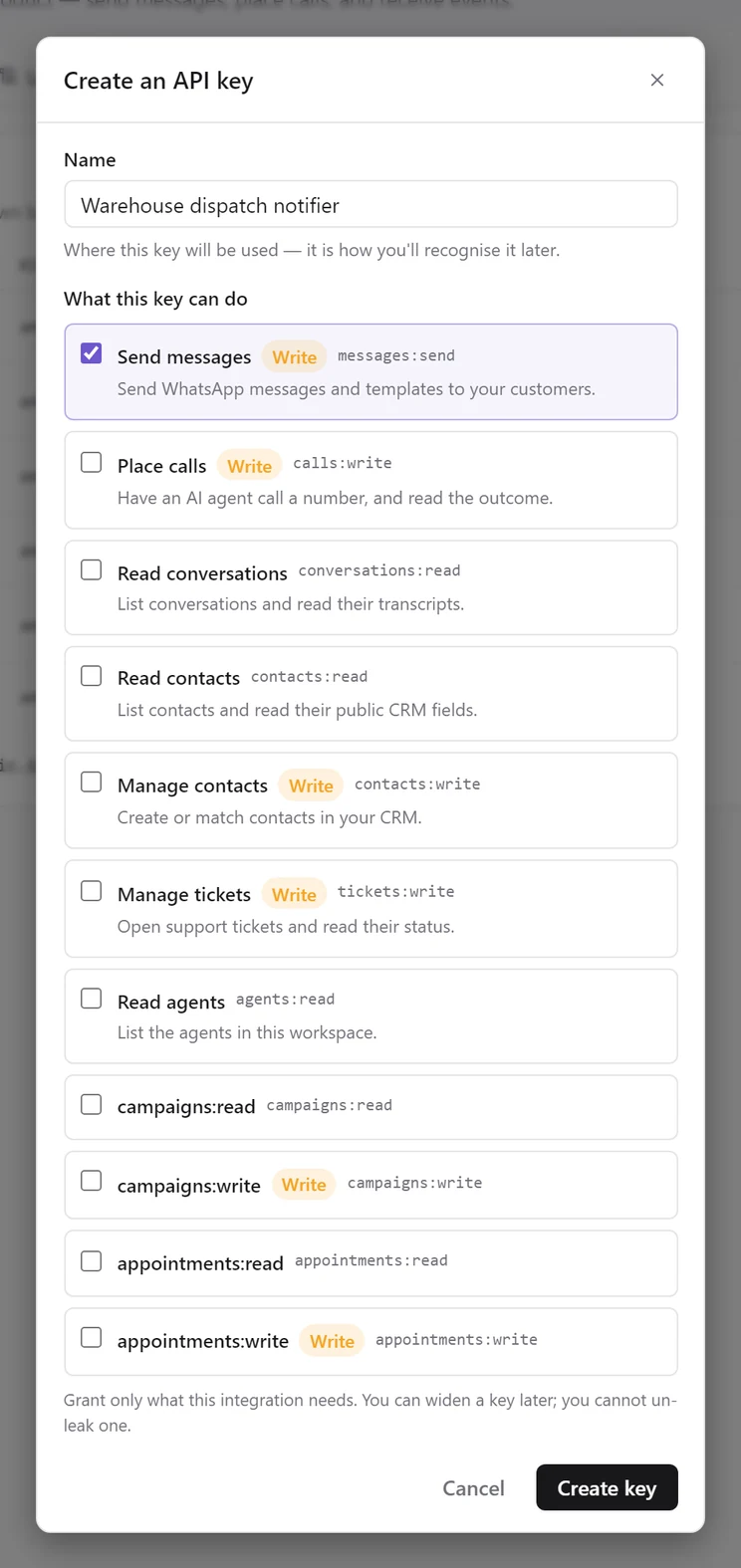
::: step Name it after the system that will hold it
`Order service (production)`, not `Test key 2`. When a key starts behaving strangely at 3 a.m., the name is what tells you which deployment to look at.
:::
::: step Choose its scopes now
Under **What this key can do**, tick what the integration needs. **Read conversations** and **Read agents** start ticked. For this page, also tick **Send messages** (`messages:send`). Untick anything the integration won't use.
A key's scopes **can't be changed after it is created**. To widen or narrow a key later, create a new key with the right scopes, deploy it, and revoke the old one. See [Change what a key can do](/console/developers#change-what-a-key-can-do) and [Scopes](/api/scopes).
:::
::: step Copy the key
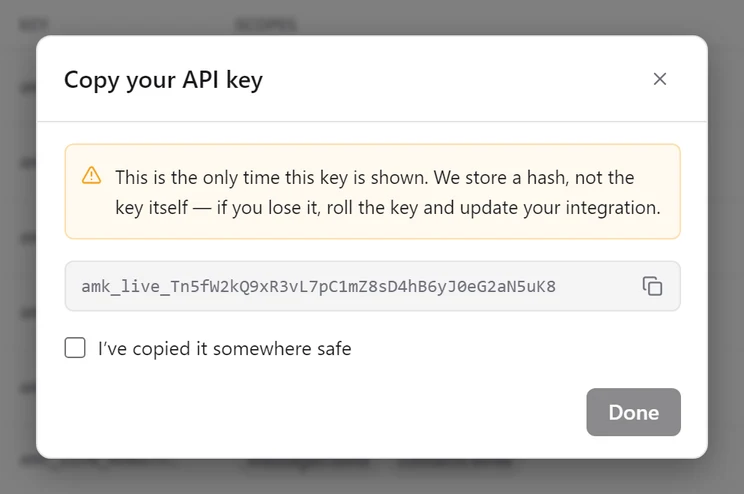
Click **Create key**. The **Copy your API key** dialog shows the full key once. Put it in your secret manager, tick **I've copied it somewhere safe**, and click **Done**.
:::
:::
::: warning The secret is shown exactly once
We store a hash, not the key. Nobody at Amomic-AI can recover it for you. If you lose it, **Roll** the key: you get a new secret with the same name and scopes, and the old one keeps working for 24 hours so you can deploy without downtime.
:::
## 2. Verify it
`GET /ping` costs nothing, changes nothing, and tells you everything about how the API sees your key. It should be the first call every integration makes.
::: codegroup
```bash cURL
curl https://services.amomic.in/api/v1/ping \
-H "Authorization: Bearer $AMOMIC_API_KEY"
```
```javascript Node.js
const response = await fetch("https://services.amomic.in/api/v1/ping", {
headers: { Authorization: `Bearer ${process.env.AMOMIC_API_KEY}` },
});
console.log(await response.json());
```
```python Python
import os, httpx
response = httpx.get(
"https://services.amomic.in/api/v1/ping",
headers={"Authorization": f"Bearer {os.environ['AMOMIC_API_KEY']}"},
)
print(response.json())
```
:::
```json title="200 OK"
{
"ok": true,
"workspace_id": "ten_01JQRS4T8XZ0AB1CD2EF3GH4",
"key_name": "Order service",
"environment": "live",
"scopes": ["agents:read", "conversations:read", "messages:send"]
}
```
Read `scopes` carefully. Most "why is this 403" questions are answered right here, before any real request is made.
## 3. Find out what your workspace can do
Ids don't exist in a vacuum — you need a sender to send *from*. `GET /channels` exists precisely because a backend integrator has no console open to copy one out of.
```bash
curl https://services.amomic.in/api/v1/channels \
-H "Authorization: Bearer $AMOMIC_API_KEY"
```
```json title="200 OK"
{
"message_channels": ["whatsapp"],
"call_channels": ["voice"],
"senders": [
{
"channel": "whatsapp",
"sender_id": "was_9f2c41ab77de1063c8a4b512",
"display_number": "+919461093306",
"verified_name": "Acme Retail",
"is_default": true,
"status": "connected"
}
]
}
```
## 4. Send a real message
Now the interesting one. This sends an actual WhatsApp message to an actual phone.
::: codegroup
```bash cURL
curl -X POST https://services.amomic.in/api/v1/messages \
-H "Authorization: Bearer $AMOMIC_API_KEY" \
-H "Content-Type: application/json" \
-H "Idempotency-Key: order-4821-shipped" \
-d '{
"to": "+919876543210",
"template": {
"name": "order_shipped",
"language": "en_US",
"variables": ["Asha", "AM-4821"]
}
}'
```
```javascript Node.js
const response = await fetch("https://services.amomic.in/api/v1/messages", {
method: "POST",
headers: {
Authorization: `Bearer ${process.env.AMOMIC_API_KEY}`,
"Content-Type": "application/json",
"Idempotency-Key": `order-${order.id}-shipped`,
},
body: JSON.stringify({
to: order.customerPhone,
template: {
name: "order_shipped",
language: "en_US",
variables: [order.customerName, order.reference],
},
}),
});
if (!response.ok) {
const { error } = await response.json();
throw new Error(`${error.code}: ${error.message}`);
}
```
```python Python
import os, httpx
response = httpx.post(
"https://services.amomic.in/api/v1/messages",
headers={
"Authorization": f"Bearer {os.environ['AMOMIC_API_KEY']}",
"Idempotency-Key": f"order-{order.id}-shipped",
},
json={
"to": order.customer_phone,
"template": {
"name": "order_shipped",
"language": "en_US",
"variables": [order.customer_name, order.reference],
},
},
)
response.raise_for_status()
```
:::
```json title="201 Created"
{
"message_id": "wamid.HBgMOTE5ODc2NTQzMjEwFQIAERgSMkI5RUE4...",
"channel": "whatsapp",
"to": "+919876543210",
"status": "sent"
}
```
```mock
{"component": "WhatsAppMock", "props": {"caption": "What lands on your customer's phone. The variables you passed are substituted into the approved template."}}
```
Three things in that request are doing real work:
- **`template` rather than `text`.** You can only send free-form text inside the 24-hour window that opens when a customer messages you. An order update almost never falls inside it. [The 24-hour window](/channels/whatsapp-window) explains when each applies.
- **`Idempotency-Key`.** Your retry after a network timeout replays the stored response instead of messaging the customer twice. See [Idempotency](/api/idempotency).
- **`variables` positionally.** `["Asha", "AM-4821"]` fills `{{1}}` and `{{2}}`. An object like `{"1": "Asha", "2": "AM-4821"}` works too.
## 5. Handle the failures properly
Every error uses the same envelope, so one handler covers the whole API:
```json title="412 Precondition Failed"
{
"error": {
"code": "failed_precondition",
"message": "This workspace has no WhatsApp sender connected.",
"details": { "reason": "channel_not_connected" },
"request_id": "req_01JQRS4T8XZ0AB1CD2EF3GH4",
"correlation_id": "cor_01JQRS4T8XZ0AB1CD2EF3GH4"
}
}
```
Branch on `error.code` for the class of problem and on `error.details.reason` for the specific cause. Log `request_id` — quoting it to support turns a support thread into a lookup.
The ones you will actually hit first:
```responses
[
{"status": 401, "code": "unauthenticated", "reason": "wrong_environment", "description": "A test key was used against production, or the reverse. Not a bad secret."},
{"status": 403, "code": "permission_denied", "reason": "missing_scope", "description": "The key is valid but lacks the scope. `details.required_scope` names it."},
{"status": 404, "code": "not_found", "reason": "template_not_found", "description": "No approved template by that name. Check spelling and approval status."},
{"status": 409, "code": "conflict", "reason": "session_window_closed", "description": "Free-form text outside the 24-hour window. Send a template."},
{"status": 412, "code": "failed_precondition", "reason": "channel_not_connected", "description": "No WhatsApp sender is connected to this workspace yet."}
]
```
[Errors](/api/errors) has the complete list.
## Test keys and live keys
There is one production API. Keys carry an environment and are checked against the host they are used on:
```params
[
{"name": "amk_live_…", "type": "live key", "required": false, "description": "Works against services.amomic.in. Real messages, real calls, real money."},
{"name": "amk_test_…", "type": "test key", "required": false, "description": "Issued in non-production environments. Sending one at the production host returns 401 with wrong_environment."}
]
```
A mismatch is always a 401 with `details.reason` of `wrong_environment` — never a silent failure and never a bad-secret error. If you see it, you have the right key pointed at the wrong host.
## Next
::: cards
::: card Place an AI call
[POST /calls](/api/calls) has your agent phone someone and talk to them.
:::
::: card Receive events
[Webhooks](/webhooks/overview) push replies, call outcomes, and new tickets to you instead of you polling.
:::
::: card A complete flow
[Order-shipped update](/recipes/order-updates) — the whole thing end to end, including retries and the webhook that closes the loop.
:::
::: card Hand it to a coding agent
[Use with agents](/agents-setup) connects these docs to Claude Code or Codex so it writes the integration with the real contract in front of it.
:::
:::